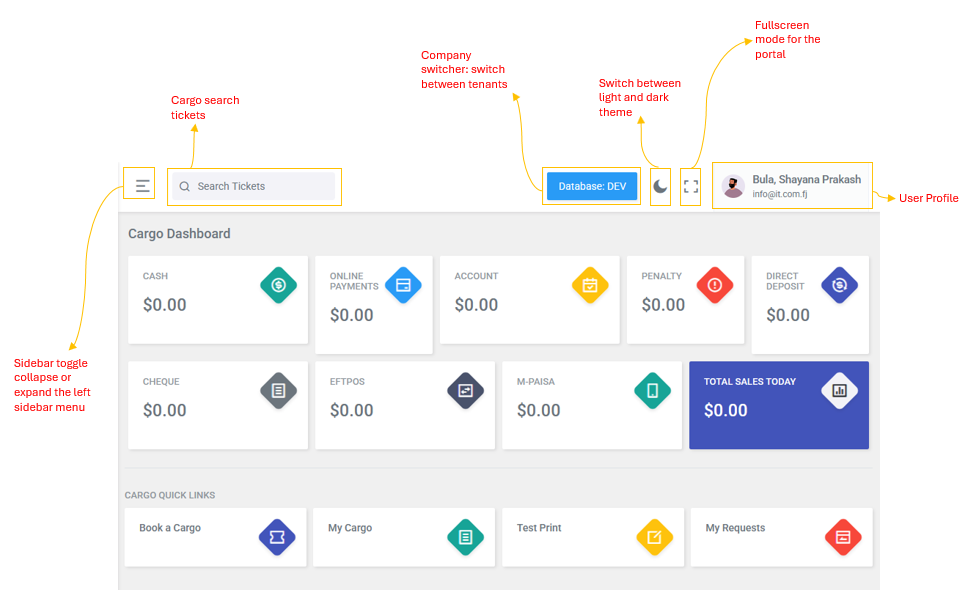
The top navigation bar is always visible at the top of the portal and provides quick access to key controls
| Icon | Feature | Description |
.png) |
Sidebar Toggle | Collapse or expand the left sidebar menu |
| Database: [Name] | Company Switcher | Switch between tenants (Interlink, Yavirau). Shows current active database |
 |
Toggle View Mode | Switch between light and dark theme |
 |
Fullscreen | Toggle fullscreen mode for the portal |
| Avatar + Name | User Profile | Displays the logged-in user name and email. Click to access the Logout option. |
| Search Bar | Ticket Search | Search for cargo tickets by number. Available on desktop; on mobile, use the search icon. |