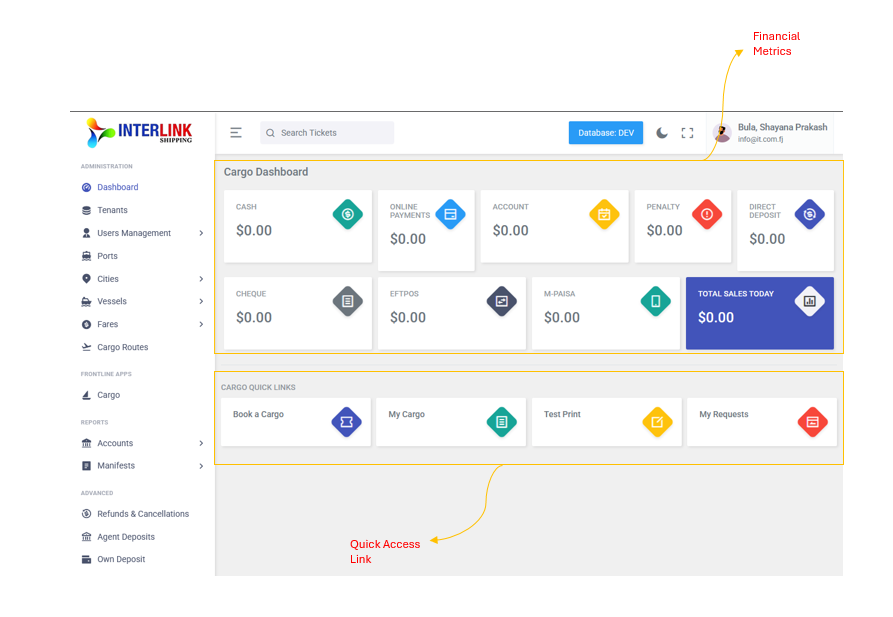
Path: Administration > Dashboard
The Dashboard id the landing page their after login. It provides a real-time overview of daily financial activity and quick shortcuts to commonly used features.
Financial Summary Cards
These cards display today's sales totals broken down by payment method:
| Icon | Card | Description |
 |
Cash | Total cash payments received today |
 |
Online Payments | Total online payments received today |
 |
Account | Total account (credit) payments today |
 |
Penalty | Total penalties charged today |
|
Direct Deposit | Total direct deposit payments today |
 |
Cheque | Total cheque payments received today |
 |
EFTPOS | Total EFTPOS transactions today |
 |
M-PAiSA | Total M-PAiSA mobile payments today |
 |
Total Sales Today | Combined total of all payment methods today |
Quick Links
Below the financial cards, the Dashboard provides quick-access shortcuts:
- Book a Cargo: Navigate directly to the Cargo booking form (also accessible from the left sidebar under Frontline App > Cargo)
- My Cargo: View cargo shipments booked by the logged-in user
- Test Print: Print a test cargo receipt
- My Requests: View pending requests submitted by the logged-in user