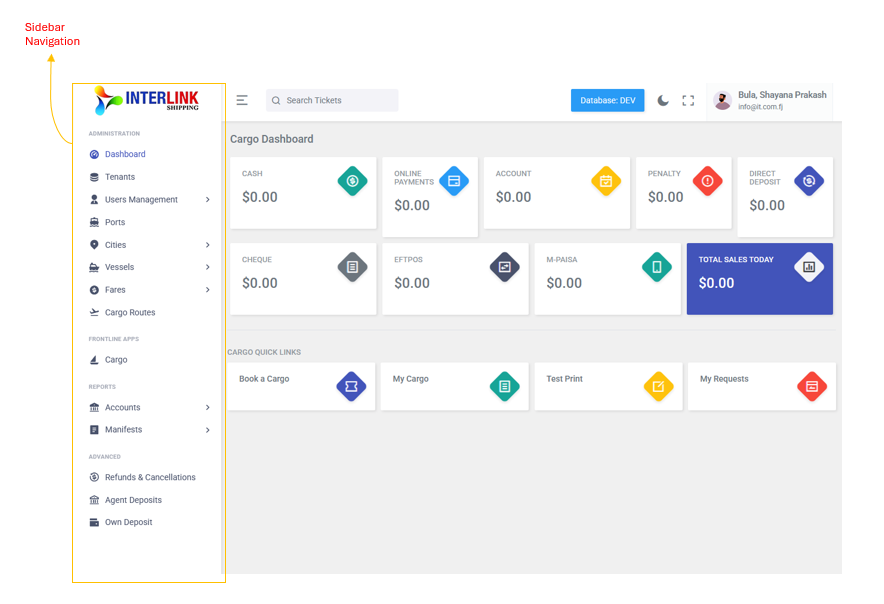
The left sidebar is the main navigation panel. Click .png) in the top bar to toggle it. The sidebar is organized into four man groups:
in the top bar to toggle it. The sidebar is organized into four man groups:
Administration
- Dashboard: Overview with financial cards and quick links
- Tenants: Manage organizational accounts
- User Management (expandable)
- Users: Individual user accounts
- Locations: Physical sites or areas
- Login Activity: Audit logs of all user logins
- Ports: Manage physical port locations
- Cities (expandable)
- List of cities: Manage city records
- Cities combination: Origin destination city pairs
- Vessels (expandable)
- List of vessels: Manage vessel records
- Cities Combination: Origin destination city pairs
- Fares (expandable)
- Cargo: Cargo fare rates only
- Cargo Route: Manage routes with leeway periods
Frontline
- Cargo: The main cargo booking form for creating shipments
Reports
- Accounts (expandable)
- Unclaimed Cargo
- Cargo Collection
- Daily Cargo Sales
- Manifests (expandable)
- Cargo Manifest
Advanced
- Refunds & Cancellation: Process cargo refund requests
- Agent Deposits: View all deposits across agents
- Own Deposit: Record you location's daily deposits