Access the Portal

To access the Interlink Shipping Portal, open your web browser and navigate to: [Your Portal URL Here, e.g., interlink-worksuite-dev.itfl.services]

Logging In

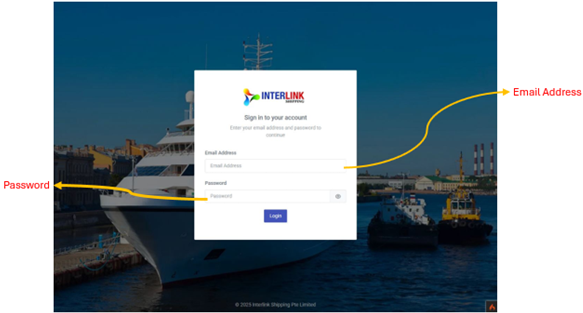
Use your assigned credentials to log in. If you encounter issues, please refer to the "Troubleshooting" section or contact your system administrator.

  1. Enter your: Username.
  2. Enter your: Password.
  3. Click the: "Sign In" button.

Upon successful login, you will be directed to the Dashboard.
Did you find this article useful?

  • Session Timeout & Inactivity Warning

    For security purposes, the portal monitors the user activity. if the remain inactive for 10 minutes,...
  • Top Navigation Bar

    The top navigation bar is always visible at the top of the portal and provides quick access to key c...
  • Left Sidebar Navigation

    The left sidebar is the main navigation panel. Click in the top bar to toggle it. The sidebar is or...
  • Dashboard

    Path: Administration > Dashboard The Dashboard id the landing page their after login. It provides...
  • Tenants

    Path: Administration > Tenants Tenants are organizational accounts in the system. Each tenant rep...