The Login Activity page provides a comprehensive log of all user login attempts and sessions within the Interlink Shipping platform. This page is accessible by expanding the 'Users Management' dropdown in the left sidebar and clicking on 'Login Activity'. It is a crucial tool for monitoring security and troubleshooting login issues.

Login Activity Table
The main section of the page displays a table listing all login activities with the following columns:
- Date: The date and time of the login attempt.
- Identifier: The email address or username used for the login attempt.
- IP Address: The IP address from which the login attempt originated. Clicking on the IP address will open a new tab with more information about the IP address (e.g., location data) via ip2location.com.
- User Agent: Information about the browser and operating system used during the login attempt.
- Status: Indicates whether the login attempt was `Success` or `Failed`.
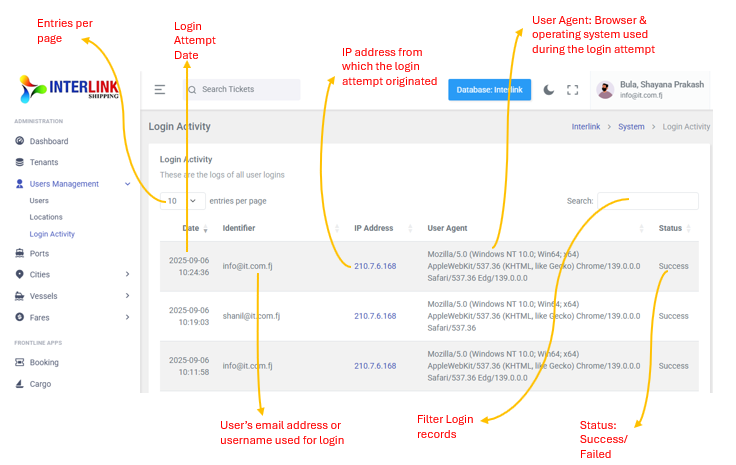
The table also includes pagination controls (e.g., "10 entries per page") and a search bar to filter login records.